Project # 1 - API Request to GitLab
We're gonna learn how to use python to talk to external applications. The application in our case will be GitLab. We'll establish a communication between out python application and GitLab application The python application will send a http request to GitLab application and then the Python application will get a http response from the GitLab application. To send an API request to GitLab, follow the steps:
Install requests Package:
First install the requests package by using pip install requests command in the terminal.

Code:
import requests

response = requests.get("https://gitlab.com/api/v4/users/[gitlab-username]/projects")

all_projects = response.json()

for project in all_projects:
    print(f"Project ID: {project['id']}")
    print(f"Project Name: {project['name']}")
    print(f"Project URL: {project['web_url']} ")
    print(f"Date of Creation: {project['created_at']}")
    print("   ")
Explanation:
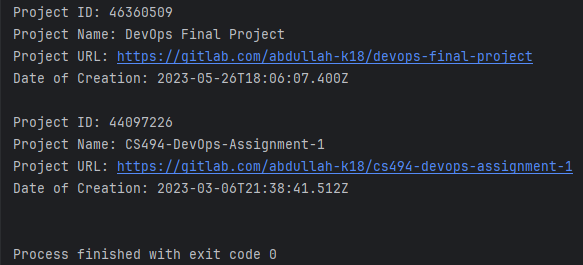
import requests: This imports therequestsmodule, which is a popular HTTP library in Python used for making HTTP requests.response = requests.get("https://gitlab.com/api/v4/users/abdullah-k18/projects"): This line sends an HTTP GET request to the specified URL (https://gitlab.com/api/v4/users/abdullah-k18/projects) using therequests.get()function and assigns the response object to the variableresponse. This URL is an API endpoint that retrieves a list of projects owned by the user with username "abdullah-k18" on GitLab.all_projects = response.json(): This line calls thejson()method on theresponseobject to parse the JSON-formatted data returned by the API endpoint. The parsed JSON data is then assigned to the variableall_projects.for project in all_projects:: This is the beginning of aforloop that iterates over each project in theall_projectslist.Inside the for loop there are some things that we will be printing. These will be the details of each project e.g. id, name, url, date created.
Output:
My GitLab: